Check Your Google Map Visibility for Free
Check Your Google Map Visibility for Free and discover the truth about your local reach. Most businesses think they’re #1 because they see themselves at the top when searching from their own office, but their customers often see something completely different.
Don't let a "false positive" search result cost you sales. Enter your business name below to get a real-time heat map of your local rankings and see exactly how you appear to customers across every corner of your city.
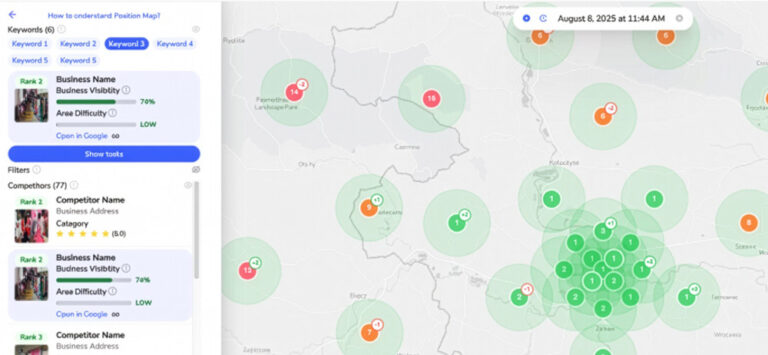
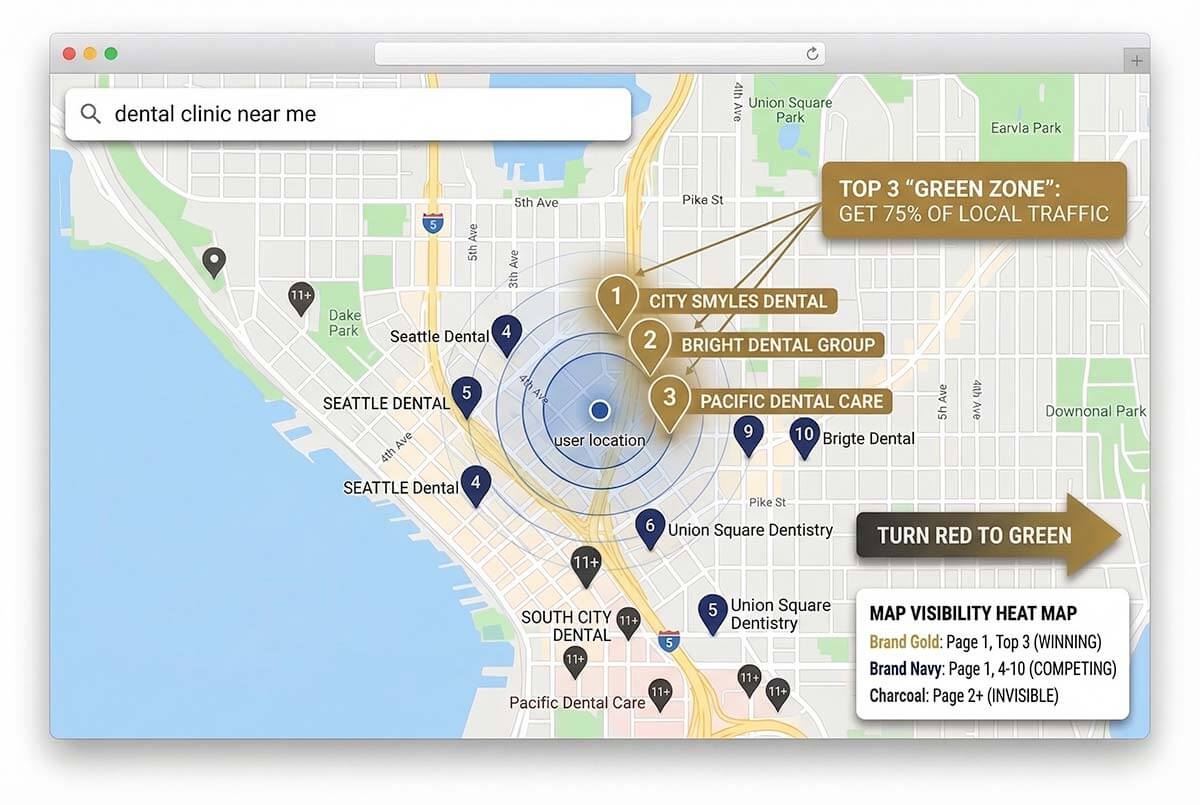
Did you see Red or Orange dots?
If you aren't in the Top 3, you are losing 75% of local mobile clicks.
Red Dots:
Your business is buried on page 2 or 3.
Customers can't find you.
Orange Dots:
You’re close, but a competitor is currently taking your leads.
Get Your Full "Local Dominance" Strategy Audit
The scan above shows where you are. Our team will show you how to fix it. Fill out the form below to receive a manual audit of your top 3 competitors and a 90-day growth roadmap.
Posted onTrustindex verifies that the original source of the review is Google. I was really pleased with CiCon’s work, professionalism, and speed. They built a beautiful, functional website for me and handled the Google search engine optimization with great results. Highly recommend them for anyone looking for reliable, high-quality web design services!Posted onTrustindex verifies that the original source of the review is Google. CiCon has been a fantastic marketing partner—creative, responsive, and results-driven. They’ve helped elevate our brand with smart strategies and great execution. Highly recommend!Posted onTrustindex verifies that the original source of the review is Google. We have had the pleasure of working with CiCon for our social media marketing and advertising needs, and the results have exceeded our expectations. Their team brings a high level of expertise, professionalism, and strategic insight to every campaign. From content creation to targeted ad strategies, they have consistently delivered measurable outcomes and enhanced our online presence. Communication is seamless, and their proactive approach ensures we stay ahead in a competitive market. I highly recommend CiCon to any organization seeking a dedicated and results-driven marketing partner.Posted onTrustindex verifies that the original source of the review is Google. We’ve been working with CiCon for our social media marketing and advertising, and the experience has been fantastic from day one. Their team is creative, responsive, and truly understands how to position our brand online. Since partnering with them, we’ve seen a noticeable increase in engagement, followers, and overall brand awareness. They regularly provide insights and updates, making it easy to track progress and results. Highly recommend CiCon to any business looking to grow their digital presence with a reliable and professional marketing team!Posted onTrustindex verifies that the original source of the review is Google. Absolutely Outstanding Marketing Partner! We have been working with Cicon Marketing Agency for several years now, and I can say with full confidence that they have played a critical role in the growth and success of our business, Sparkle Light. From day one, Majid and his talented, professional team brought an incredible level of creativity, expertise, and genuine dedication to our marketing efforts. They handled everything from high-quality content creation—including stunning product photography and professional video production—to managing our entire digital marketing strategy. They helped us elevate our presence across every major social media platform, including Instagram, Facebook, YouTube, and TikTok, creating engaging and brand-consistent content that truly resonates with our audience. Their insights and work on Google SEO have also significantly improved our visibility online, bringing in new customers and increasing our overall reach. What makes Cicon truly stand out is their personalized approach and commitment to excellence. Majid has always been readily available to understand our goals and offer strategic guidance. The team listens, adapts, and always goes the extra mile to ensure results. We have seen measurable improvements in our brand awareness, customer engagement, and most importantly—sales. I truly believe Sparkle Light would not be where it is today without their continued support. Thank you, Majid and everyone at Cicon, for being such a reliable, forward-thinking, and inspiring marketing partner. I highly recommend Cicon Marketing Agency to any business that wants to grow with confidence and creativity! — Sparkle Light
Frequently Asked Questions
Yes, 100%. There is no cost to run the scan. If you request the follow-up manual audit and 90-day roadmap from our team, that initial consultation is also free.
Google personalizes search results based on a user’s exact location and search history. If you frequently search for your own business while standing at your business, Google learns to show it to you. This tool bypasses that bias to show you what an average customer sees from different points across the city.
Absolutely not. In fact, that’s why we built this tool. Red and orange simply mean your competitors are currently out-optimizing you. Knowing where you are losing is the first step. By optimizing your Google Business Profile, gathering reviews, and improving local relevance, you can expand your “Green Zone.”
We don’t just send you a generic automated PDF. One of our local SEO specialists will manually review your heat map results, analyze your top three nearest competitors, and draft a specific 90-day roadmap with actionable steps. We will then email you to schedule a brief 15-minute call to review those findings together.